





A few tricks to avoid the ‘Phishing’ trap

Phishing is a technique that scammers use to obtain personal information by posing to be from a legitimate source. As a result, there are many people who fall for phishing emails. We regularly update this blog with details about fraudulent emails that attempt to phish for information, but now we would like to tell readers how to identify fraudulent URLs that could be from potentially malicious parties.
Fake emails generally create a sense of panic and urgency and implore readers to act immediately. Our first piece of advice is to never click on a link provided in a suspicious email. Visit the official website instead. Never copy and paste such links blindly.
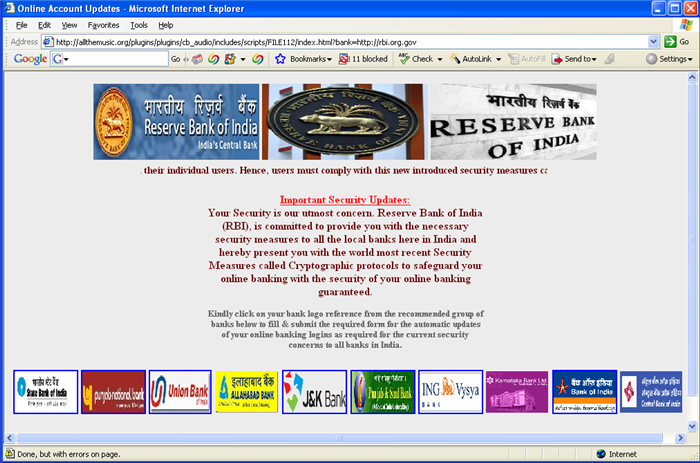
Here are some more tips to spot fake links or URLs:
- Hover the mouse over a link before you click. This will reveal the real destination address in case it is a masked link.
- Beware of the @ sign in the URL as all browsers ignore characters that appear before the sign. For instance, the URL “www.google@wooder.com” will not take you to a Google webpage.
- Check the spelling of the URL carefully. Scammers sometimes change a single character to try and trick victims. For instance, many people will feel at first glance that “www.micorsoft.com” is the same as “www.microsoft.com”.
- Check if the URL of the page you are directed to is the same as that mentioned in the email.
- Read the link properly. For instance, the URL “www.apple.com.wooder.com” will not take you to the official Apple website.
- Ensure that the link does not start with an IP address. For instance, “https://198.162.256.56/wood/index.htm” is the kind of link that you must never trust.
- There are several services online which shorten URLs to cater to character count limitations. To avoid falling for fake shortened URLs you should use a service like “www.longurl.org” which reverses the process to show you the real destination.
- On another note, it is also advisable to not download any suspicious attachments. If it is necessary, you must download and scan them separately.
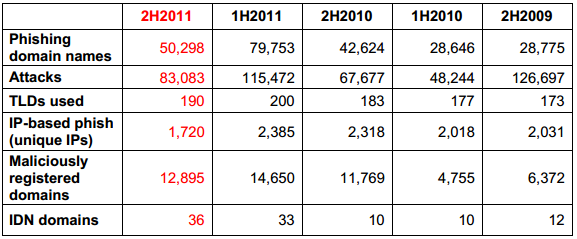
The following table from the Anti-Phishing Working Group (APWG) provides some troubling information. According to them, there were at least 83,083 unique phishing attacks worldwide in 190 top-level domains (TLDs) in the second half of 2011. The attacks used 50,298 unique domain names.
Additionally, here’s how you can spot an authentic URL:
- Check the salutation. Genuine emails will address you in a personal manner (either with a username or an account number).
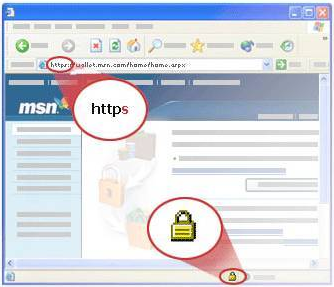
- Genuine URLs will have SSL (Secure Socket Layer) security. This can be spotted by reading the URL and finding the term “https”.
- Genuine URLs will have a lock symbol at the bottom right corner of the screen or in the address bar right before the URL. This signifies the digital certificate and you can click on this symbol and check authentication information.
We strongly suggest that you make use of the best anti-spam software like Quick Heal Internet Security on your machine. This will provide you with real-time protection against constant threats and ensure that your computer never falls victim to malicious phishing emails. Even if you accidentally open a malicious URL, a strong antivirus will detect threats as soon as they appear on your machine.