





Have you used these easy and effective Quick Heal Parental Control tools?

Parents of school going kids have several questions when it comes to cyber security. Some of these issues involve the freedom and time that should be given to kids when they access the Internet. Other questions revolve around the mode of access in the first place. Today it is very common to see pre-teens with top of the line smartphones that provide instant web access but is this a good idea?
Parenting children and enabling them to understand the importance of cyber security and safety measures is something that needs to be handled responsibly. Several factors come into play here; some can be controlled whereas some cannot. Fortunately, there are many tools that can efficiently be utilized to achieve this purpose. One of these tools is the Parental Control feature of Quick Heal products and this empowers you to control your child’s exposure to the underlying dangers of the web.
Many parents of school going children are not even aware of the versatile Parental Control features on offer. In order to customize these controls, one needs to click on the Parental Control icon in the Quick Heal dashboard. These settings can be applied to all users of a machine or can be restricted to specific users as well. Here are the prominent customizations offered by Parental Control.
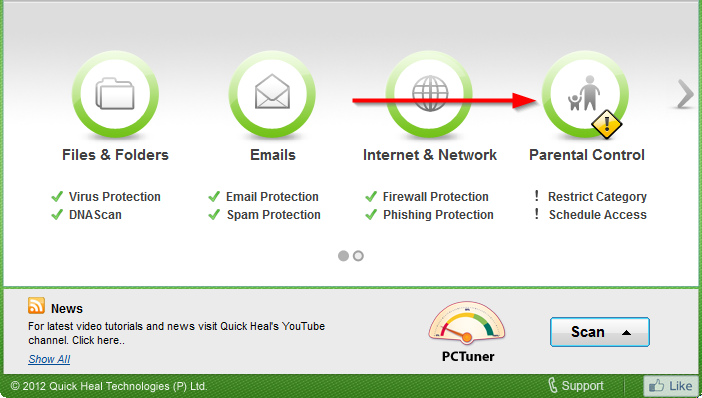
Restrict access to particular categories of websites
This feature allows you to block specific website categories and all the URLs that come under them. This prevents your child from visiting unwanted websites. For instance, categories like Adult, Child Abuse, Crime and Violence, Pornography etc. can be blocked completely.
Restrict access to particular website
With this feature, any known website can be blocked completely. The URL needs to be added to a list of blocked websites and this prevents the URL from opening at any time. Moreover, all subdomains of a website can also be added to the blocked list through this feature.
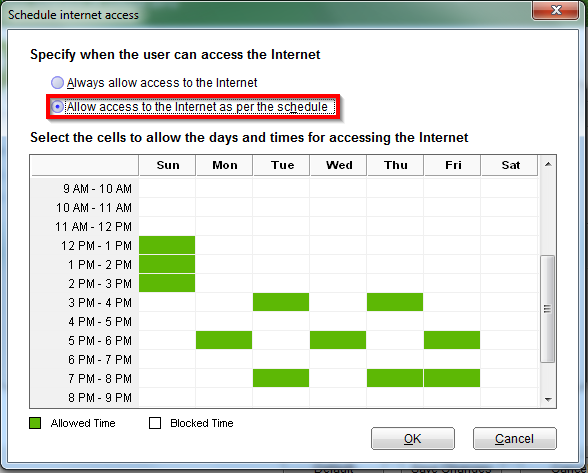
Schedule Internet access
This versatile feature allows you to create a weekly schedule for Internet access. If any website is visited in a time outside the schedule, it will simply be blocked. The schedule can be set on an hourly basis for any day of the week and it is entirely up to you to decide how many hours on which day Internet access will be allowed.
Responsible parenting recognizes that there is a right time for children to own gadgets and to get complete and unsupervised access to the Internet. Of course, it lies in the hands of parents themselves to decide the most suitable time for this and to also ensure that the best virus protection software is enabled. Quick Heal Parental Control features are present for the benefit of those who wish to utilize them. With the right awareness and usage of appropriate tools, children can be protected from several emerging cyber threats.