





Tips to Identify Fake Antivirus

“Antivirus here and there, which one to trust…” Okay that might be a bad phrase, but you get the point right. Fake antivirus software are in line with some of the major threats prevalent on the Internet today. Many people have ended up paying money for such software which are either malicious or just keep lying on their computer hogging space and doing nothing. Cutting the long story short, we are giving you tips to identity fake antivirus software which have become more deceitful with time.
How Do Fake Antivirus Get on People’s Computers?
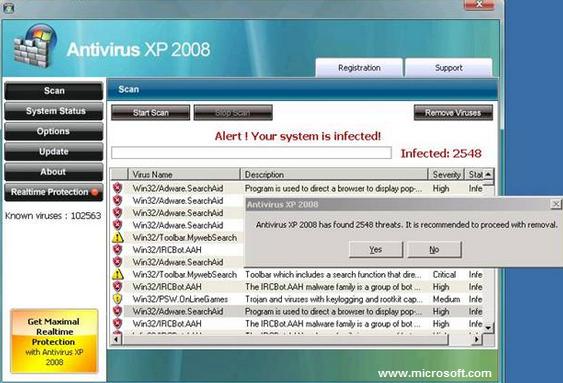
Most of the time, fraudulent or malicious websites serve users with popups claiming that their computer is infected. And to remove the infection, they must download a free copy of Antivirus available on the website itself. In other words, scammers use scare tactics to trick uninformed users into downloading such fake software.
How to Identify Fake Antivirus Software
Exaggerated Notifications
Fake antivirus have a knack of exaggerating things. They will inform you about threats that do not exist on your computer. They will always draw a sense of urgency and panic.
Pay Per Clean
Fake antivirus are solely created to siphon money from their victims. A fake antivirus will project as if it is scanning your PC for infections, and after scanning it will demand money to clean the system. A genuine antivirus, even if it’s a free trial copy, will detect an infection, clean it and give you a report of the same.
Every Scan Detects Infections
Fake antivirus have this mysterious, supernatural technology that helps them detect at least a dozen infections with every scan. Even if two harmless notepads on your system are scanned by a fake antvirus, odds are, you will get an infection alert.
Bucket Full of Alerts and Notifications
An essential feature of modern antivirus software is their less intrusive nature. Most legitimate, trusted, and advanced security software try not to bother the user unless it is a matter of great urgency. Quick Heal, for instance, has a feature called Silent Mode. Once it is activated, you will not receive any kind of notifications on your computer. And this, does not affect your PC’s overall security. It just means that the antivirus is doing its job without creating a scene. Fake antivirus, on the other hand, are like hypersensitive alert systems that go off even with the touch of a feather. Such software will keep pushing fake, annoying popups and notifications.
Google is not Speaking Good About it
If Googling your antivirus gives back badmouthed user reviews and comments, and no legitimate website or source, then that speaks volumes about the antivirus you are going to install or you already have. Trusted and known antivirus software are placed pretty well in Google search results. They may be having negative user comments, but which service or product does not. The important thing is, they are real and do what they should do – protect users from malware and viruses.
So, that would be all for a quick lowdown on some useful tips you can use to spot fake antivirus. If you have Quick Heal on your system, then you need not worry about this. However, you can always share these tips with your friends and acquaintances. Stay safe!