New Ransomware Alert! TeslaCrypt is After Your Game Files

The ransomware menace is becoming a sore of the Internet. Just last month, we had released an extensive blog post about the alarming growth in ransomware attacks across the world. There are around 12 families of ransomware detected in the wild as of now. And joining the gang is a new member called TeslaCrypt.
What is Ransomware?
Ransomware is a sophisticated malicious program that takes control (hijacks) of the infected computer or its data, and demands money (ransom) from its victim. Ransomware is broadly classified into two types:
1. The first type is an Ecryptor. This ransomware encrypts (converts information into a code) the infected computer’s data including images, videos, documents, presentations, and spreadsheets. It demands a ransom to decrypt the files.
2. The second type is a Screen Locker. As the name suggests, this program freezes or locks up the victim’s computer, and makes it nonfunctional, until a ransom is paid.
What is TeslaCrypt?
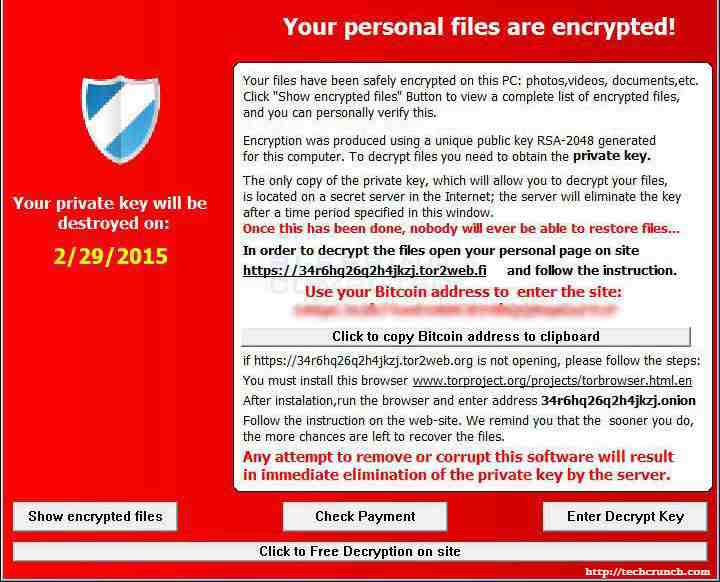
TeslaCrypt is a new ransomware in the town. It works in a similar way as other encrypting ransomware. Once inside the system, it starts looking for data including images, docs, spreadsheets, PowerPoint presentations, etc. However, unlike the others, it also seeks out saved game files (replays, maps, configurations, etc.) in the infected computer. Having found the files, the malware starts converting them into an encrypted form which can be only accessible by a user who has a private key to it. And to get this key, the victim has to pay a ransom of 1.5 Bitcoins (about $373.92).
Who are the Primary Targets?
1. Users of MS Windows
2. PC Gamers
What Games are being targeted by TeslaCrypt?
Presently, the following games are known to have been targeted by this ransomware:
| • Call of Duty | • RPG Maker |
| • World of Warcraft | • League of Legends |
| • DayZ | • Dragon Age |
| • Minecraft | • StarCraft |
| • Fallout and Diablo | • World of Tanks |
| • Bethesda Softworks File | • F.E.A.R. 2 |
| • Steam NCF Valve Pack | • EA Sports |
| • Unreal 3 | • Unity Scene |
| • Assassin’s Creed | • Skyrim animation |
| • Bioshock 2 | • DayZ profile file |
| • RPG Maker VX RGSS | • Unreal Engine 3 Game File |
| • S.T.A.L.K.E.R. | • Dragon Age Origins |
How Can TeslaCrypt Infect your Computer?
TeslaCrypt mostly spreads via spam emails where it may be hidden in the form of a downloadable attachment. Such emails also contain links to malicious websites, visiting which may download the ransomware automatically on the user’s machine.
Files Infected by TeslaCrypt
Files with following extension get encrypted by TeslaCrypt.
.sql, .mp4, .7z, .rar, .m4a, .wma, .avi, .wmv, .csv, .d3dbsp, .zip, .sie, .sum, .ibank, .t13, .t12, .qdf, .gdb, .tax, .pkpass, .bc6, .bc7, .bkp, .qic, .bkf, .sidn, .sidd, .mddata, .itl, .itdb, .icxs, .hvpl, .hplg, .hkdb, .mdbackup, .syncdb, .gho, .cas, .svg, .map, .wmo, .itm, .sb, .fos, .mov, .vdf, .ztmp, .sis, .sid, .ncf, .menu, .layout, .dmp, .blob, .esm, .vcf, .vtf, .dazip, .fpk, .mlx, .kf, .iwd, .vpk, .tor, .psk, .rim, .w3x, .fsh, .ntl, .arch00, .lvl, .snx, .cfr, .ff, .vpp_pc, .lrf, .m2, .mcmeta, .vfs0, .mpqge, .kdb, .db0, .dba, .rofl, .hkx, .bar, .upk, .das, .iwi, .litemod, .asset, .forge, .ltx, .bsa, .apk, .re4, .sav, .lbf, .slm, .bik, .epk, .rgss3a, .pak, .big, .allet, .wotreplay, .xxx, .desc, .py, .m3u, .flv, .js, .css, .rb, .png, .jpeg, .txt, .p7c, .p7b, .p12, .pfx, .pem, .crt, .cer, .der, .x3f, .srw, .pef, .ptx, .r3d, .rw2, .rwl, .raw, .raf, .orf, .nrw, .mrwref, .mef, .erf, .kdc, .dcr, .cr2, .crw, .bay, .sr2, .srf, .arw, .3fr, .dng, .jpe, .jpg, .cdr, .indd, .ai, .eps, .pdf, .pdd, .psd, .dbf, .mdf, .wb2, .rtf, .wpd, .dxg, .xf, .dwg, .pst, .accdb, .mdb, .pptm, .pptx, .ppt, .xlk, .xlsb, .xlsm, .xlsx, .xls, .wps, .docm, .docx, .doc, .odb, .odc, .odm, .odp, .ods, .odt,
Steps to Stay Away from Ransomware
1. Never download attachments or click on links in emails received from unwanted or unexpected sources, even if the source looks familiar.
2. Don’t respond to pop-up notifications or alerts while visiting unfamiliar websites.
3. Apply all recommended security updates to your OS, software, and Internet browsers, if not already.
4. Have a security software installed in your PC that efficiently blocks spam and malicious emails, and automatically restricts access to malicious websites.
THE MOST IMPORTANT STEP TO TAKE!
Regular data backup is the only way you can recover from a ransomware attack. Once TeslaCrypt encrypts your files, there is no way that you can decode them without buying the private key. And paying crooks is something we and even the law enforcement do not recommend.
So, take regular backups of all the important files you have on your computer. We recommend you to begin the backup procedure offline and not when you are connected to the Internet. This is because, ransomware also target files in external storage drives. And once you are done, disconnect the backup drive.
What to do if your Computer is Infected with TeslaCrypt?
1. Disconnect your system from the Internet.
2. Disconnect any external storage devices connected to your computer.
3. Run a virus scan on your computer.
4. Get help from a local computer expert to ensure that the infection is gone. Thereafter, you can restore your files from your backup. Running a System Restore may also help.
How can Quick Heal help?
Quick Heal helps prevent ransomware infections with its real-time Email Security that blocks spam, infected and malicious emails. Its Web Security feature automatically blocks infected and malicious websites. Also, Quick Heal detects TeslaCrypt as Ransom.Tescrypt.A4 and proactively blocks the infection.