





Chrome Offers In-Built Feature to Protect Google Accounts

Today, there are several web based applications and services that can be accessed with the help of a Google account. While this is useful and convenient for many, it also poses a security risk as all these services gain knowledge about the Google accounts of everyone. What this effectively means is that there is a long list of web services that have the usernames and passwords of user’s Google accounts. If those services get hacked or accidentally leak that information, the damage for individual users could be huge. Moreover, people are also prone to phishing attacks as some of these pages can be created specifically with the intention of stealing Google account information.
So what security steps can you take to stay protected against this specific risk? One way is to take the extra few minutes of effort and create accounts with each of these services. Whenever you wish to use a particular service, use the unique login ID and password associated with it. If you find that you have too many passwords to remember, you can always make use of an effective password manager like LastPass.
As per Google’s official blog:
“The most effective phishing attacks can succeed 45% of the time, nearly 2% of messages to Gmail are designed to trick people into giving up their passwords, and various services across the web send millions upon millions of phishing emails, every day.”
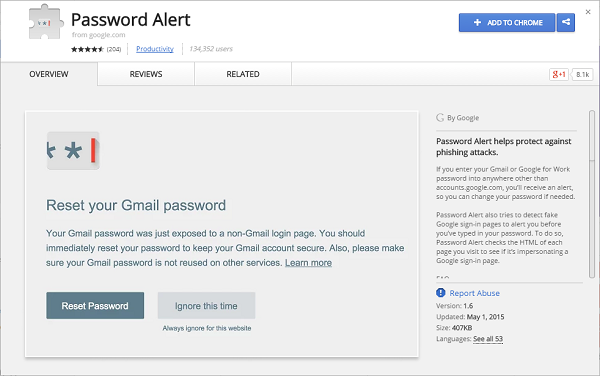
In order to combat this threat, Google has recently released a new Google Chrome extension called Password Alert. This is a free open-source Chrome extension that protects Google apps and related accounts. Once installed, it the Chrome extension shows a warning when a user types his Google password into a site that is not an official Google page. This is a good step in the right direction as it helps people avoid phishing attacks and also encourages people to use different passwords for different user accounts for platforms.
Keep your Google Account safe with Password Alert. Get it here → https://t.co/ZolP4K5Wh9 pic.twitter.com/fwVCROc8iG
— Google (@google) April 29, 2015
Google also stated the following about the extension:
“Once you’ve installed and initialized Password Alert, Chrome will remember a “scrambled” version of your Google account password. It only remembers this information for security purposes and doesn’t share it with anyone. If you type your password into a site that isn’t a Google sign-in page, Password Alert will show you a notice. This alert will tell you that you’re at risk of being phished so you can update your password and protect yourself.”
While this move is not the answer to all phishing concerns, it is a step in the right direction for all Google users. We highly recommend that you make use of this feature while surfing the web.