Security Hole in Gmail Android App Makes Phishing Attacks Easier

A recently discovered bug in the Gmail Android App allows anyone to pose as someone else, hiding their real email address. Although labelled as a “non-issue” by Google Security Team, the flaw can prove to be helpful for online scammers. Read the rest of the story from the post that follows.
Phishing has been one of the oldest tricks in the history of cyberattacks. And with time, scammers have been able to devise new and slier ways to trick people into phishing traps. And a new security bug discovery by Yan Zhu, an independent security researcher, may just make this trick more successful.
This security bug is known to affect the Gmail Android app as of now. This is how it works:
If the user changes their display name in the Gmail Account Settings, their real email address will be hidden in the recipient’s inbox.
For instance, if you change your display name to “”security@google.com”, the same name will be displayed in every email that you send out. And in that email, your real email address will be hidden; and there’s no way to reveal it.
So, how does this bug encourage phishing attacks?
This flaw is more likely to be abused by online scammers who could spoof their display name to some trusted or reputed entity such as a popular online shopping site, a bank, a financial organization or companies like Google, Facebook, etc. To unsuspecting users, a sender with the name security@facebook.com or security@google.com may not appear suspicious. And this is where, they could fall into a phishing trap.
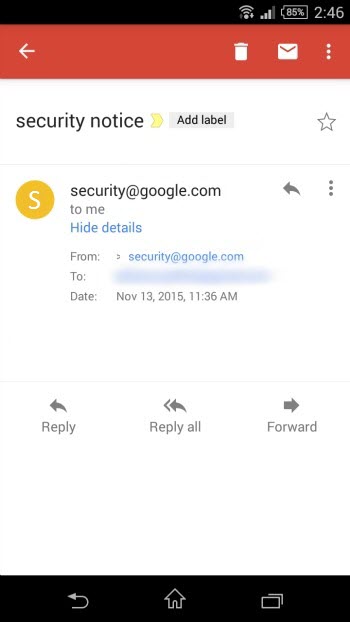
However, it is important to note that, this security flaw only gets triggered if the display name has extra quotation marks in it – for instance, “”security@google.com”
On the other hand, if the display name does not have these quotation marks, the bug won’t get triggered, and the recipient will be able to view the real email address of the sender.
So, the bottom line remains the same
Beware of any kind of unexpected or unwanted email, regardless of who is sending it to you. If the email sounds urgent or important, you can always give a call to the sender and have the information verified. Also, having a mobile antivirus app that can block spam, phishing, and malicious emails, adds to your security.
If you think this post is helpful, share it with your friends, family members, and acquaintances. If you wish to receive such alerts and security tips directly to your inbox, then click here to subscribe to our blog. Stay safe!