





How to Identify Fake Apps in the Google Play Store

What is the first thing we do whenever we get our hands on a shiny new phone? No points for guessing! We download apps – all kinds of them; games, messaging, wallpapers, media streaming, utility and so on. But hold on! Are we careful about what we let inside our phones? Sadly, most of us aren’t. The Google Play Store has always been in the news for being infested with fake and malicious apps. And that is why, we should keep our eyes peeled for every app that we install on our phone to ensure that it does not land us on the hunting ground of hackers and scammers. So, here are some really simply tips on how to identify fake apps in the Google Play Store. Jot them down, if you will.
Identifying fake Android apps
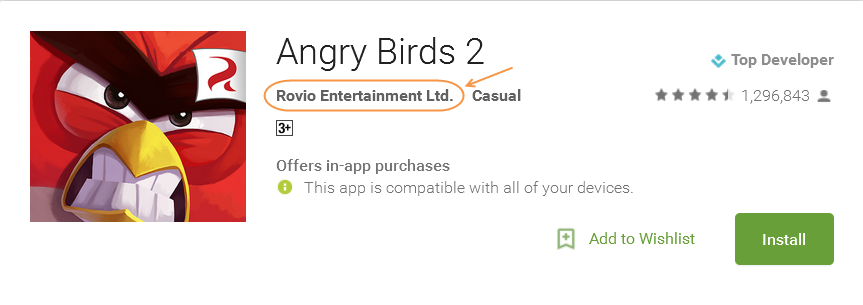
1. Do a little research about the developer of the app you plan to install. The developer’s name is placed right below the app. Google the name and see what you get. A genuine developer is most likely to have a website and other valid and verifiable details on the Internet.
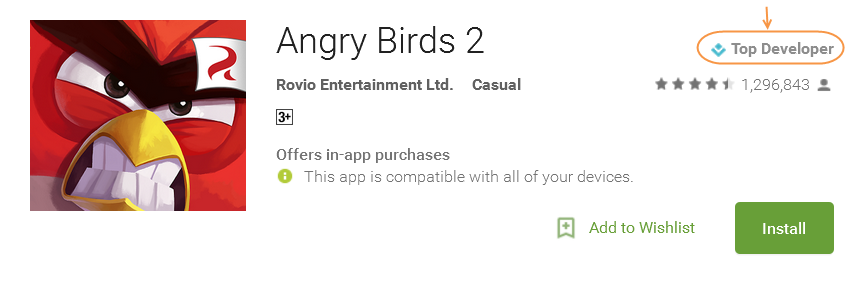
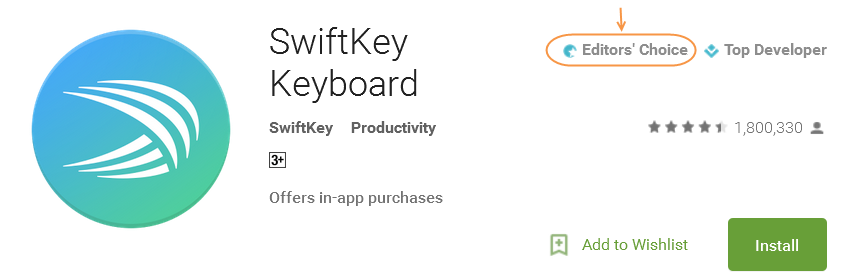
2. Check out the developer’s profile too. Those with tags “Editor’s Choice” or “Top Developer” are least likely to be fishy.
3. Very important – read all app permissions carefully. A bit of common sense is what can help you tell the right from the wrong. The rule of thumb to remember here is, the permissions asked by an app must comply with its functions/features. For instance, if Skype app requires your permission to access SMS, call logs, media files, etc., then that’s alright, because these are required for obvious reasons. On the other hand, if a gaming app or a flash light app requires similar permissions, stay away – that’s a bad app!
4. Not all apps in the play store are “apps” but they are just mobile websites. Noticing this is also an important step to identify fake apps in the Google Play Store. And if you come across any such apps, especially those that are crowded with ads, then stay away. Genuine developers develop “apps” that can be useful to you and not mobile websites to scam you into clicking on ads or other links.
5. Noticing user ratings and reading their reviews also helps. In most cases, if an app is fake or malicious, it is likely that you will come across reviews that say so.
6. Another cool way to find out if an app is not what it seems to be, is to simple ask the Internet. Google “Is (app name) safe to install”. If the app has a bad reputation, it will show up in the search results.
Google Play might contain risky apps, but it is way safer than unofficial and third party app stores. You might be lured into discounts and other ‘benefits’ for downloading apps from such sources, but know that, you are risking your privacy and security by doing so. If truth be told, hackers and scammers stay one step ahead of us; tirelessly webbing plans to trick us. There are times, when it is just impossible for normal users to identify fake or malicious apps. And how can they? These apps look exactly like the real ones. And it is in these situations, where we might just let our mobile phone be controlled by a rogue app controlled by a hacker sitting in some dingy corner of the world. A simple countermeasure to this sort of problem is a mobile security app. With constant scan and real-time updates, this app can block fake and malicious apps from getting installed on your device. And it can also block infections spread via compromised websites.
So, the next time you come across an interesting app, do consider using the tips discussed above, and have a reliable Android mobile security software installed on your phone.
If you think you should share the above tips on how to identify fake apps in the Google Play Store with your friends and acquaintances, do share this post and spread the word. Stay safe!