





Solution to System Freezing Issue faced by Quick Heal Users

It has been brought to our notice that some of our users are facing a technical issue wherein their computer hangs up/freezes after performing a restart. This post explains the steps to be taken to resolve this issue.
Problem description:
A certain group of Quick Heal users have reported that their computer tends to freeze/hang up after restart. The problem occurred after users received the update that was released on 14th March 2016 at around 9:08 PM.
Symptoms:
- Computer freezes while booting and a black screen appears.
- In some cases, the user is able to boot the computer and the desktop is loaded. But, the system freezes when any operation is performed like clicking on the Start Menu or My Computer, launching Windows Explorer, etc.
Affected users:
- Quick Heal AntiVirus Pro (v16.00)
- Guardian NetSecure (v16.00)
Note: Except the ones listed above, all other Quick Heal products are unaffected.
Affected language version:
- English
Affected Operating Systems:
- Windows 7 and above
Solution for affected users:
We recommend users to follow the steps mentioned below:
If system is not at all usable you can try starting the computer in Safe Mode and implement the steps below. In this case, you will need to download the ZIP file (DisableARW.zip) on some other computer and transfer it to the affected computer using a pen drive, etc. If your system is functioning normally, then the below steps can be implemented in normal mode.
1. Click on the link below; this will download a ZIP file named “DisableARW.zip”:
> https://dlupdate.quickheal.com/tools/DisableARW.zip
2. Go to the location where the file DisableARW.zip has been downloaded. Right click on it, to extract it to any temporary location
3. After extraction, you will get a file named “DisableARW.REG”. Double click on it.
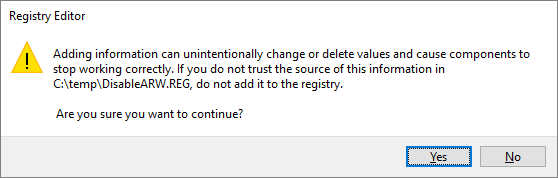
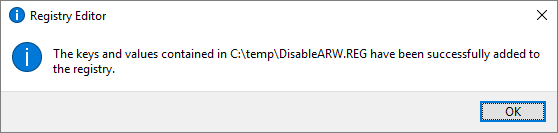
4. Click Yes to the confirmation message displayed by Registry Editor. Click OK
Important recommendation for unaffected users:
Users who have received the 14th March update but haven’t faced the computer restart/freeze issue, are recommended to apply the update released on 15th March 2016 at around 3:25 PM. Also, they are advised not to restart their computer before applying this update.