How to Prevent Ransomware From Locking Your PC

The Quick Heal Threat Research Lab has been detecting increased numbers of ransomware infections over the last few weeks. We have recently reported on the notorious Dridex ransomware. These incidents depict a clear trend that malware authors are steadily shifting to serious money making ransomware variants.
The rise in these ransomware variant detections can be attributed to the following primary reasons:
- Ransomware has proven itself as a highly effective money extortion mechanism over the last year.
- Ransomware has become much easier to develop due to the availability of source code and the emergence of ‘Ransomware-as-a-service’ products in the black market.
- Ransomware is increasingly being used along with other successful and penetrative malware propagation techniques such as spam campaigns, ‘Malvertising’ and ‘Social Engineering’.
- Ransomware has become efficient due to the presence of Bitcoins, a digital currency that enables cybercriminals to collect money anonymously.
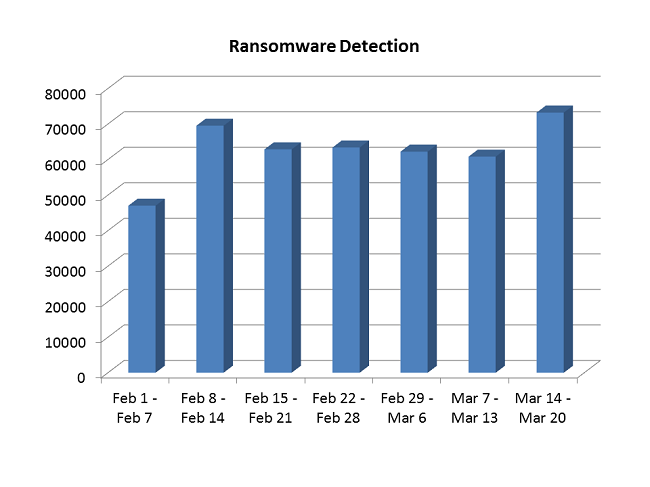
Stats for Ransomware Detection by Quick Heal
This graph shows the number of ransomware detections by Quick Heal for the 7 weeks starting from February 1st, 2016. In this time period, our lab has detected nearly 450,000 ransomware samples, which work out to approximately 9,000 ransomware detections every single day. These figures present a considerable rise in the ransomware detections that we have seen in the past, and they highlight the growing threat of ransomware to businesses and individual users.
There are a few foolproof precautions that need to be undertaken to prevent ransomware variants from infiltrating and locking your machine. These safety guidelines are even more relevant for enterprises and small business owners who are often the most sought after victims of ransomware authors.
1. Backup your data often and in different ways
When it comes to data security, the first step is data classification. It is essential for data owners to segregate their data into crucial, moderate or dispensable categories and then devise ways to secure their most sensitive information. We recommend the 3-2-1 rule – maintain 3 different copies of data, in 2 different formats, with 1 format available offline.
2. Update your OS and other applications & utilities
Malware developers typically exploit vulnerabilities in applications and the OS to breach system security. To prevent incidences it is highly recommended to automatically download OS updates, and apply regular security patches for other applications on the system. Commonly targeted applications are Java, Adobe Acrobat Reader, Adobe Flash Player, MS Office and web browsers such as Google Chrome, Mozilla Firefox, Internet Explorer and more.
3. Be cautious of suspicious emails and attachments
Spam emails have become one of the most effective ways for ransomware to enter vulnerable systems. Through social engineering techniques or by disguising emails to appear as authentic ones, attackers cause victims to click on fraudulent links or download malicious attachments. When it comes to email security, we suggest the following security measures:
- Always check the email senders information
- Always verify the content of the email properly
- Never click on the links embedded within suspicious emails
- Never open or execute attachments received from unknown senders
Some More Ransomware Prevention Techniques
- Personalize spam settings for your email inbox and your installed security solution.
- Use the native Windows functionality of ‘Show File Extensions’. This shows the extensions of unknown files before opening them.
- In case of breaches or infections, immediately disconnect the Internet connection.
- Keep the Windows Firewall switched on at all times and regularly monitor its settings.
- Enable your installed security software to scan compressed and archived files when they enter the system.
- Turn off AutoPlay for USB devices, so that they do not immediately open the files within them.
- Consider installing an add-on which blocks automatic pop-ups on your browser.
Recently, ransomware infections have begun spreading via JavaScript codes on websites as well. So there are multiple avenues through which ransomware can be delivered into vulnerable systems. Quick Heal defends against the latest malware samples with generic and heuristics-based detections that are discovered through our global virus signature database on a daily basis. Moreover, Quick Heal security products also provide multiple lines of defense such as Virus Protection, Email Protection, DNAScan and Advanced Behavior Detection System for complete system security.