Ransomware Alert! ODIN – A new variant of Locky Ransomware


A new variant of the infamous Locky Ransomware has been observed in the wild. It’s called Odin. This variant appends the extension .odin to the files it encrypts with new ransom note filenames. This ransomware is being spread via spam emails that carry a malicious WSF Script attachment.
How Odin encrypts the victim’s files
• Once the user opens the WSF Script attachment, a ransomware payload gets downloaded from a malicious website as an encoded file without any extension.
• The file gets decoded into a Windows Dynamic Link Library (DLL) file.
• The payload is launched using rundll32.exe which encrypts the files stored on the infected system, renames the encrypted files, and appends the .ODIN extension to them.
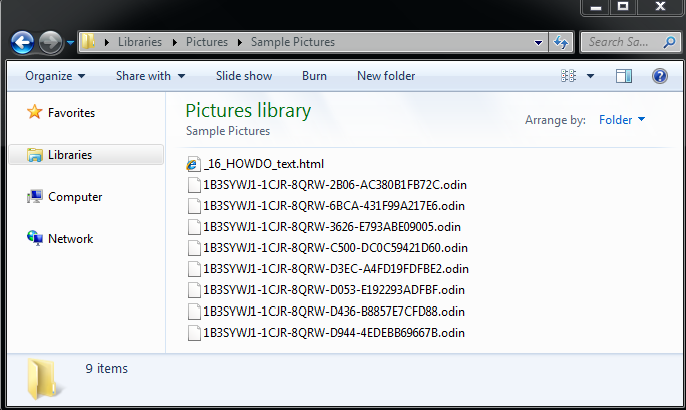
Fig 1
Below are the ransom notes created by the ODIN ransomware:
_16_HOWDO_text.html
_HOWDO_text.bmp
_HOWDO_text.html
After the ransomware encrypts the infected computer’s files, it changes the desktop wallpaper to the below note (_HOWDO_text.html) (fig 2). The note informs the user that their files have been encrypted and the only way to decrypt them is by using a private key and a decryption program. This is followed by other instructions.
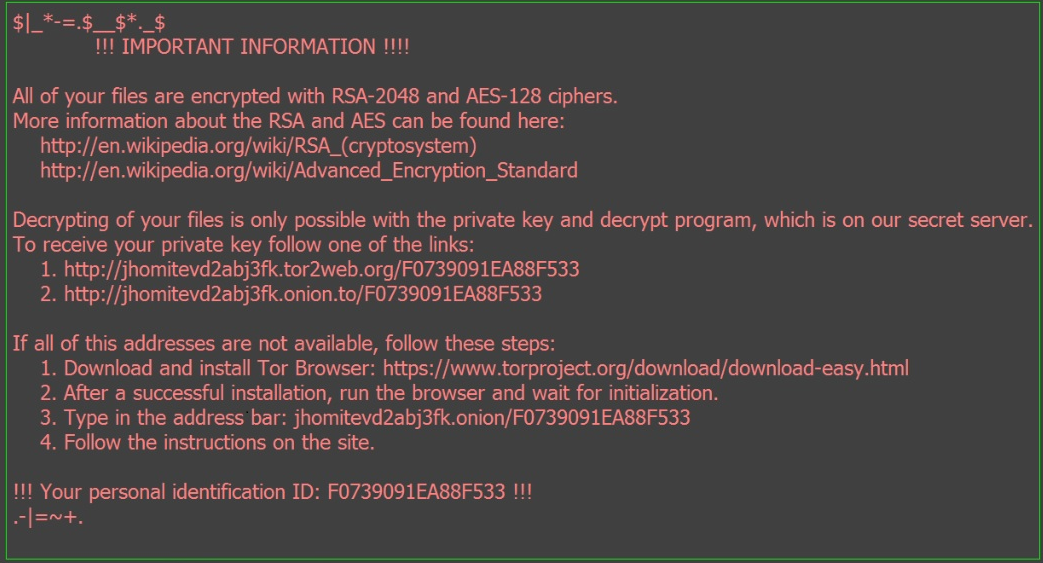
Fig 2
Quick Heal Virus Protection proactively detects the malicious DLL file as “Ransom.Zepto.PB7” and the malicious WSF Script file as “JS.Locky.FT” and reduces the risk of the ransomware infection.
Ransomware has become a perpetual threat for individual users and businesses too. Once it encrypts any files, it is impossible to decrypt the data unless a ransom is paid to the perpetrator. Given the extent of the damage a ransomware can do to your data, it is important that you follow the recommended security measures mentioned below.
- Back up your files on a regular basis. A ransomware goes after your files when it infects your computer. If you have a backup of all your important files, there is no reason why you should give in to the ransomware’s demands. Remember to disconnect the Internet while you are backing up on an external hard drive. Unplug the drive before you go online again. Several free and paid Cloud backup services available on the market that can take data backup periodically.
- Use a reliable antivirus software that can block infected emails, websites, and stop infections that can spread through USB drives. Keep the software up-to-date.
- Apply recommended security updates for your computer’s Operating System and all other programs such as Adobe, Java, Internet Browsers, etc.
- Do not click on links or download attachments that arrive in emails from unwanted or unexpected sources. Even if such emails seem to be from a known source, it is better to call up the sender and verify them first.
ACKNOWLEDGMENT
Subject Matter Expert
- Anita Ladkat (Threat Research and Response Team)