



Quick Links


Popular Searches



Close
Products
Looking for enterprise solutions?
Discover SeqriteLooking for enterprise solutions?
Discover SeqriteLooking for enterprise solutions?
Discover SeqriteLooking for enterprise solutions?
Discover SeqriteLooking for enterprise solutions?
Discover SeqriteYou can register/activate Quick Heal antivirus online, offline, and through SMS as per your convenience.
Registering online
If you are connected to the Internet, you can register your product online.
1. Open Quick Heal antivirus.
2. On the Quick Heal Dashboard, click the Register Now button.
3.On the Registration Wizard, enter the 20-digit Product Key and click Next.
The Registration Information appears.
4.Enter relevant information in the Purchased From and Register for text boxes, and then click Next.
5.Provide your Name, Email Address, and Contact Number. Select your Country, State, and City.
If your State/Province and City are not available in the list, you can type your locations in the respective boxes.
6.Click Next to continue.
A confirmation screen appears with the details you entered.
If any modifications are needed, click Back to go to the previous screen and make the required changes.
7.Click Next to continue.
Your product is activated successfully. The expiry date of your license is displayed.
8.Click Finish to close the Registration Wizard.
After the registration process completes, you are prompted to create an account with Quick Heal RDM that allows you to manage your device remotely. To know about how to create an account with Quick Heal RDM, see Remotely Manage Quick Heal in the user manual.
Registering offline
You can register Quick Heal antivirus offline if your computer is not connected to the Internet. Before registering offline, make sure you have product key, installation number, and activation license key ready with you.
You may contact our technical support team
To retrieve your lost product key, visit Lost page and fill the required information. Alternatively, you may write to support@quickheal.com with the purchase details. We will respond as soon as possible.
To retrieve your lost Product key, visit the page: Lost and provide your necessary information.
Alternatively, write to us at support@quickheal.com, providing your purchase details, and we will respond to your request promptly.
You can download and install Quick Heal antivirus using either the Quick Heal installer or a Quick Heal CD.
To download and install the latest Quick Heal antivirus using the Quick Heal Installer, please follow these steps:
Using the Quick Heal CD
Yes, Quick Heal Antivirus is designed to support visually impaired users. To enable screen reader functionality, you will need to download the third-party tool, NVDA Screen Reader version 2024.4.2 .
The NVDA screen reader is available for free to all users.
Overview
You can change your Quick Heal at any time from the Password Management settings. You can also enable Safe Mode Protection to prevent unauthorized users from accessing or modifying Quick Heal settings when Windows is running in Safe Mode.
Steps to change your password
A success message appears once your password has been changed successfully.
Note: The password is updated for all Quick Heal products linked to the registered email address.
What is Safe Mode Protection?
Windows Safe Mode starts your computer with only the basic files and drivers required to run the system. By default, Quick Heal security features may be disabled when Windows is running in Safe Mode.
This can allow an unauthorized user to access or modify Quick Heal settings and potentially compromise your system.
Safe Mode Protection helps prevent this by requiring a password when accessing Quick Heal in Safe Mode.
Why should I enable Safe Mode Protection?
Enabling Safe Mode Protection adds an extra layer of security by:
Important
Make sure you remember your new password. You will need it to access password-protected Quick Heal settings and, if enabled, to use Quick Heal while Windows is running in Safe Mode.
Password requirements
When creating or resetting your password, make sure it meets the following requirements:
Overview
If you have forgotten your Quick Heal password, you can reset it using your registered mobile number or email address. Follow the steps below to verify your identity and create a new password.
Steps to reset your password
A success message appears once your password has been successfully updated.
Note: The new password is updated for all Quick Heal products linked to the registered email address.
Important
Make sure you have access to the registered mobile number or email address to complete the verification process.
Choose the verification method that is most convenient for you and follow the on-screen instructions to securely reset your password.
Password requirements
When creating or resetting your password, make sure it meets the following requirements:
When you may see this error
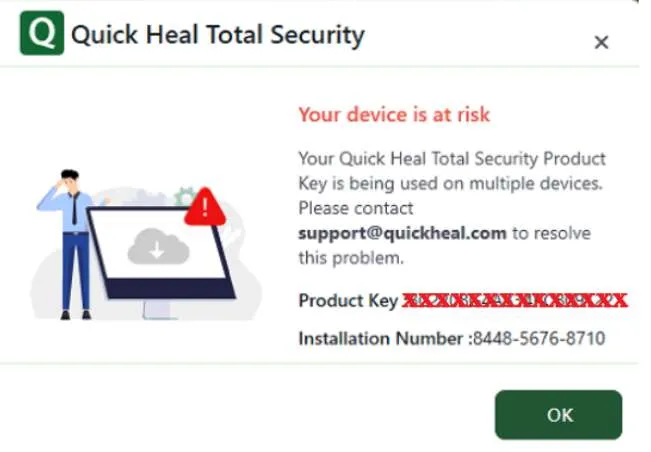
You may see an “Invalid License” or “Your device is at risk” message when your Quick Heal product key is being used on multiple devices in the following situations:
You may see the following message:
“Your Quick Heal product key is being used on multiple devices. Please contact support@quickheal.com to resolve this problem.”
Scenario 1: product key activated on multiple systems
If you are not sure which computer was the first system where you activated your product key, please contact our support team at support@quickheal.com.
We recommend contacting us from your registered email address to help us verify your license details.
Please provide the following information:
Once we receive your details, our support team will validate your license information, identify the valid installation, and take the necessary action to allow the appropriate installation and block unauthorized instances.
Scenario 2: Same Product Key Used on Multiple Systems
If you are using the same product key on more than one computer, you need to use a separate product key for each system.
What you need to do
Scenario 3: same product key used on a dual boot system
If you have two operating systems installed on the same computer, the same product key may be detected on both operating system installations.
For a Dual Boot setup, you need to activate Quick Heal separately on each operating system using a separate product key.
What you need to do
Important

HAVE AN IDEA FOR US TO IMPROVE?
SHARE YOUR IDEA
WANT TO BE A PART OF OUR GROWTH?
Partner (Retail/Affiliate) with Us
Please complete your information below to login.